
Enter projects in the research information system and add information
On this page, scientists, employees in deaneries and scientific centres at JLU, as well as administrative staff at JLU responsible for project management, can find information on how to add and update information on projects in the JLU research information system.
Basics
Reasons for recording project information in the research information system
Definition of the term ‘project’ in the JLU research information system
The information about research projects already recorded in the research information system was first entered into Excel in accordance with the forms completed by the project managers for the creation of an SAP project number and then imported semi-automatically into the research information system in a second step.
As a rule, therefore, only the information about who holds the role of project manager is available, but not the roles of the other project members, as the previous form for applying for an SAP project number does not contain this information.
Projects are always recorded in the research information system if they meet at least one of the following requirements:
- The project is funded by third-party funds.
- The project is funded by secondary funds (funds from the state of Hesse) or by JLU itself, and the content of the project is research-related.
For follow-up projects or third-party funding approvals for several people, separate project entries are created in the JLU-CRIS if the projects have separate funding codes or project numbers from the third-party funding provider. This is necessary due to administrative procedures within JLU and with regard to the funding provider.
Read, edit and delete rights for project information in the research information system
Exporting and editing project information
Accessing and checking the project list in the research information system
As part of the initial filling of the JLU-CRS, the Research Department has already pre-filled all project information in the CRIS that we have been informed about so far.
We would be grateful if you could check whether the list of your projects is complete as part of the initial filling process. Instructions on how to export the project list in Excel format can be found below. Please inform the Research Department by email at fis if entries for projects are missing completely, providing a link to the project website or further information.
In future, you will not have to enter the projects yourself; this work will be carried out permanently by the Research Department.
You can find the information stored for your projects by clicking on ‘Projects’ in the menu bar on the left. A list of all projects will open. You can change an individual entry by clicking on ‘Edit’ below the entry. Alternatively, you can also click on the title of the entry. An overview page for the project will open. There you can click on ‘Edit’ next to the title.
In both cases, a form view with several tabs containing information about the project will open. Here you can edit, change or add information on a voluntary basis.
Export project list
A list of project information in Excel format can be accessed as follows:
- Click on 'Contributions' in the menu bar on the left.
- A list of all projects related to your profile will open.
- Select the 'Report' icon in the medium grey bar.

- Select the entry 'Report on all listed entries'.
- Click on the purple 'Generate report' button.

An Excel file will be generated in the background, which you can then save via your browser.
Edit individual project information
| Title of the filed | Information about the field | Display in the research information system |
|
Key information |
||
| Type of project |
Due to different data entry masks in the CRIS and different digital administration processes, a distinction is made between the following project types:
|
Yes |
| Type of fund |
The following types of funding are distinguished:
|
Yes |
| External funding notice | Document upload possible | No |
| Approval notice/ Contract | Document upload possible. | No |
| Date of forwarding to Dez. D | Date entry possible. | No |
| Title |
No directly editable. Since most funding bodies require notification of changes to project titles, you must inform the Research Department via a short process in CRIS in order to change the field. |
Yes |
| Acronym |
Not directly editable. Since most funding bodies require notification of changes to project titles, you must inform the Research Department via a short process in CRIS in order to change the field. |
Yes |
| File reference/ Funder support code | Text field | Yes |
| Funding | Yes | |
| Funder |
Not directly editable. If the listed funder is incorrect for the projects, please contact by e-mail to fis. |
Yes |
| Project executing organisation | see above | Yes |
| External cooperation partner | Yes | |
| Start date |
Not directly editable. Since most funding bodies require notification of changes to project titles, you must inform the Research Department via a short process in CRIS in order to change the field. |
Yes, year only. |
| End date |
Not directly editable. Since most funding bodies require notification of changes to project titles, you must inform the Research Department via a short process in CRIS in order to change the field. |
Yes, year only. |
| Total fund |
Not directly editable. Since most funding bodies require notification of changes to project titles, you must inform the Research Department via a short process in CRIS in order to change the field. |
No |
| Currency |
Not directly editable. Since most funding bodies require notification of changes to project titles, you must inform the Research Department via a short process in CRIS in order to change the field. |
No |
| Principal investigator |
Not directly editable. Since most funding bodies require notification of changes to project titles, you must inform the Research Department via a short process in CRIS in order to change the field. |
Yes |
| Purpose according to the Core Data Set Research |
A recommendation by the German Council of Science and Humanities on the provision of research information, the core research data set, distinguishes between the following project purposes:
|
Yes |
|
Further details |
||
| Project Member - JLU internal co-Investigators | Yes | |
| Scientific research center of Giessen University | Yes | |
| Related project application | No | |
| Previous project | Yes | |
| Abstract | Yes | |
| Detailed description | Yes | |
| URI | Yes | |
| Country | Yes | |
| Publications linked to the project | Yes | |
|
SAP-Link |
||
| Related SAP project numbers | No | |
| Finance plan | No | |
| Comment on the SAP project number | No | |
|
Change information |
||
| Changes to project information relevant to funding bodies | No | |
|
Research areas |
||
| No | ||
|
DFG Research Areas
|
No | |
| DESTATIS sections | No | |
| KDSF Research Areas | No | |
| Sustainability Goals | Yes | |
Are there important details for managing your projects missing from the list, or would you like to change fields in the CRIS that you cannot edit, i.e. that are greyed out? If so, please send your change/entry suggestion to fis. Thank you.
Communicate fundamental changes to projects via CRIS to all administrative units involved
Certain information stored in CRIS cannot be easily changed because it must be coordinated with the funding agency or accompanied by JLU internal administration. This applies to the following fields:
- Acronym and title
- Funding body
- Terms
- Approved amount and currency
- Associated SAP project number
Please send your change/entry proposal to fis.
Initiate further digital administrative processes relating to projects in the CRIS
Store project-related publication lists in the CRIS
Applying for SAP project numbers for projects
Linking content in the CRIS
Assign large equipment to JLU projects
The ‘Relate’ function allows you to link data records to other information in the CRIS. This function is used to quickly assign multiple data records to other categories or research information in the CRIS so that the information is also displayed in this other location in the research information system. For example, you can use the ‘Relate’ function to assign publications to a large-scale piece of equipment at JLU because that equipment was used to enable the publication. It can also be used to quickly mark which publications, projects or research projects. After linking, the corresponding publications are automatically listed in the research portal at https://forschung.uni-giessen.de/ on the detail page of the respective large-scale equipment or project.
- Open your publications and choose afterwards the category 'Further details' by clicking on 'Further details' in the menu bar.
- Below you will find the rubrique 'Related equipment'
- Another menu opens:

- A search bar will open. Enter the device name or project title in the search bar and click on the magnifying glass icon (see points 1 and 2) OR use the A-Z icon to display all devices/projects.
- Select an entry from the results list by clicking on the blue plus sign.
A new window will open. The publication is now linked to the corresponding other content.
If you cannot yet see the projects you are working on in your CRIS menu, please contact fis. Thank you.
Assign projects to UN Sustainable Development Goals (SDGs)
For research projects listed in the CRIS from 2023 to 2025, the Office for Sustainability will conduct an initial assessment of any sustainability references. This classification can then be confirmed or corrected by the scientists involved in the project. From 2026 onwards, any sustainability references in research projects listed in the CRIS must be identified by the researchers themselves.
The ‘Relate’ function allows you to link data records to other information in the CRIS. This function is used to quickly assign multiple data records to other categories or research information in the CRIS so that the information is also displayed in this other location in the research information system. For example, you can use the ‘Relate’ function to assign publications to UN sustainability goals or research projects. After linking, the corresponding publications are automatically listed in the research portal at https://forschung.uni-giessen.de/ on the detail page of the UN sustainability goal or project.
- Open the list view of your publications by clicking on 'Contributions - Outputs' in the menu bar on the left.
- Find the record you want to change. If necessary, use the option to filter the records.
- In the publication list, select the checkbox on the left next to one or more publications that you want to link to the same SDG:
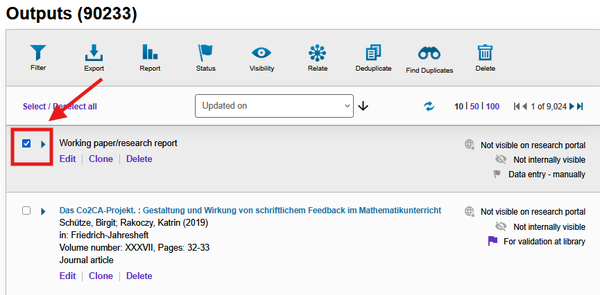
Select items - Click on the 'Relate' icon in the light grey menu bar at the top.

Relate icon
Another menu opens: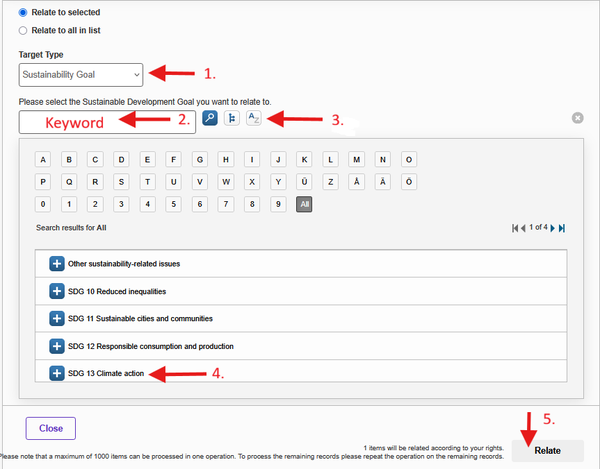
Relate equipment


- Among other things, you will be asked for the ‘Target Type’. Select ‘Sustainability Goal’ or 'Projects' here (see point 1 in the illustration above).
- A search bar will open. Enter the device name, project title or sustainability goal in the search bar and click on the magnifying glass icon (see points 2 and 3) OR use the A-Z icon to display all projects/sustainability references.
- Select an entry from the results list by clicking on the blue plus sign (see point 4).
- Click on the 'Relate' button (see point 5).
A new window will open. Click on the ‘Apply’ button in this window. The publication is now linked to the corresponding other content.
If you cannot yet see the projects you are working on in your CRIS menu, please contact fis. Thank you.
Contact
Department for Digital Research Information Systems
Dr. Rebecca Hahn and Vanessa Wagner
fis